ScreenshotHud
A 2D user interface that allows users to capture and save screenshots to their local device.
| Memory category | Instances |
|---|
Member index 11
Description
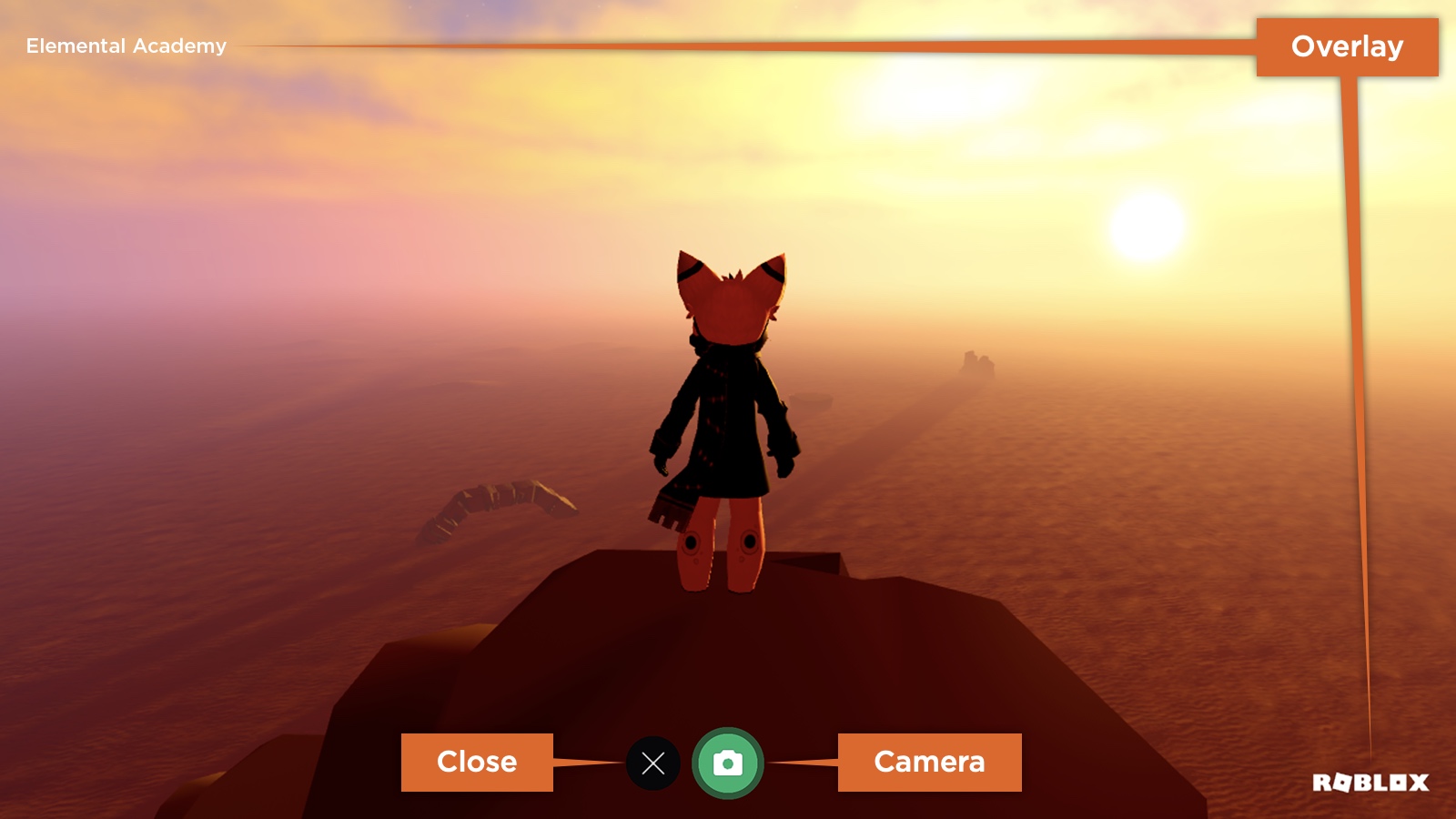
The ScreenshotHud is a 2D user interface that allows users to capture and save screenshots to their local device. It consists of the following UI elements:
- An overlay containing the experience name and Roblox branding. These remain on screen when a screenshot is taken, although the experience name can be disabled through the ScreenshotHud.ExperienceNameOverlayEnabled property.
- A camera button that hides all UI except for the overlay and takes a screenshot.
- A close button that closes the ScreenshotHud.
History 24
- 725 Add CameraButtonIconContent
- 645 Change ValueType of CameraButtonIcon from Content to ContentId
- 632 Change Tags of from [] to [Hidden, Deprecated]
- 632 Change Tags of from [] to [Hidden, Deprecated]
- 632 Change Tags of from [] to [Hidden, Deprecated]
- 605 Add HidePlayerGuiForCaptures
- 605 Add HideCoreGuiForCaptures
- 553 Change Default of Visible from to
- 553 Change Default of from to
- 553 Change Default of from to
- 553 Change Default of from to
- 553 Change Default of CloseWhenScreenshotTaken from to
- 553 Change Default of CloseButtonPosition from to
- 553 Change Default of CameraButtonPosition from to
- 553 Change Default of CameraButtonIcon from to
- 532 Add Visible
- 532 Add
- 532 Add
- 532 Add
- 532 Add CloseWhenScreenshotTaken
- 532 Add CloseButtonPosition
- 532 Add CameraButtonPosition
- 532 Add CameraButtonIcon
- 532 Add ScreenshotHud
Members 11
CameraButtonIcon
| Type | Default | |
|---|---|---|
| ContentId | ||
Asset ID of the icon used for the camera button.
| Thread safety | ReadSafe |
|---|---|
| Category | Appearance |
| Loaded/Saved | true |
History 3
- 645 Change ValueType of CameraButtonIcon from Content to ContentId
- 553 Change Default of CameraButtonIcon from to
- 532 Add CameraButtonIcon
CameraButtonIconContent
| Type | Default | |
|---|---|---|
| Content | ||
The image Content used as the icon for the camera button on the ScreenshotHud. This is the Content-type equivalent of the legacy ScreenshotHud.CameraButtonIcon property and supports asset URIs. When set, the camera button displays the specified image instead of the default icon.
| Thread safety | ReadSafe |
|---|---|
| Category | Appearance |
| Loaded/Saved | true |
History 1
CameraButtonPosition
| Type | Default | |
|---|---|---|
| UDim2 | ||
Screen location of the camera button.
| Thread safety | ReadSafe |
|---|---|
| Category | Appearance |
| Loaded/Saved | true |
History 2
- 553 Change Default of CameraButtonPosition from to
- 532 Add CameraButtonPosition
CloseButtonPosition
| Type | Default | |
|---|---|---|
| UDim2 | ||
Screen location of the close button.
| Thread safety | ReadSafe |
|---|---|
| Category | Appearance |
| Loaded/Saved | true |
History 2
- 553 Change Default of CloseButtonPosition from to
- 532 Add CloseButtonPosition
CloseWhenScreenshotTaken
| Type | Default | |
|---|---|---|
| bool | ||
Determines whether the ScreenshotHud closes automatically when a screenshot is taken.
| Thread safety | ReadSafe |
|---|---|
| Category | Data |
| Loaded/Saved | true |
History 2
- 553 Change Default of CloseWhenScreenshotTaken from to
- 532 Add CloseWhenScreenshotTaken
HideCoreGuiForCaptures
| Type | Default | |
|---|---|---|
| bool | ||
Determines whether Roblox's core GUI is hidden while a screenshot is
captured through the ScreenshotHud. Defaults to true, so any
enabled CoreGuiType elements are hidden for the duration of the
capture and restored afterward. A saved capture is only flagged as
GUI-free when both this property and
ScreenshotHud.HidePlayerGuiForCaptures are enabled.
| Thread safety | ReadSafe |
|---|---|
| Category | Data |
| Loaded/Saved | true |
History 1
HidePlayerGuiForCaptures
| Type | Default | |
|---|---|---|
| bool | ||
Determines whether the local player's GUI is hidden while a screenshot is
captured through the ScreenshotHud. Defaults to true, so any
enabled ScreenGui instances under the
Players.LocalPlayer's PlayerGui are hidden for the
duration of the capture and restored afterward. A saved capture is only
flagged as GUI-free when both this property and
ScreenshotHud.HideCoreGuiForCaptures are enabled.
| Thread safety | ReadSafe |
|---|---|
| Category | Data |
| Loaded/Saved | true |
History 1
Visible
| Type | Default | |
|---|---|---|
| bool | ||
Determines whether the ScreenshotHud is visible.
| Thread safety | ReadSafe |
|---|---|
| Category | State |
| Loaded/Saved | true |